
Hybrid Cloud Computing for Businesses With Legacy IT Systems
Businesses rarely replace their entire IT environment overnight. Many organizations still depend on legacy servers, applications, file systems, databases, and network infrastructure that support important day-to-day operations.
At the same time, cloud technology continues to change how businesses manage applications, data, collaboration, security, and remote access. Moving everything to the cloud may sound like the obvious next step, but it is not always practical—or necessary.
This is where hybrid cloud computing can make sense.
A hybrid approach allows a business to keep selected workloads on existing infrastructure while using cloud services for systems that benefit from greater flexibility, accessibility, or scalability. For organizations with older technology, this can provide a more controlled path toward modernization without forcing every system through the same migration process.
What Is Hybrid Cloud Computing?
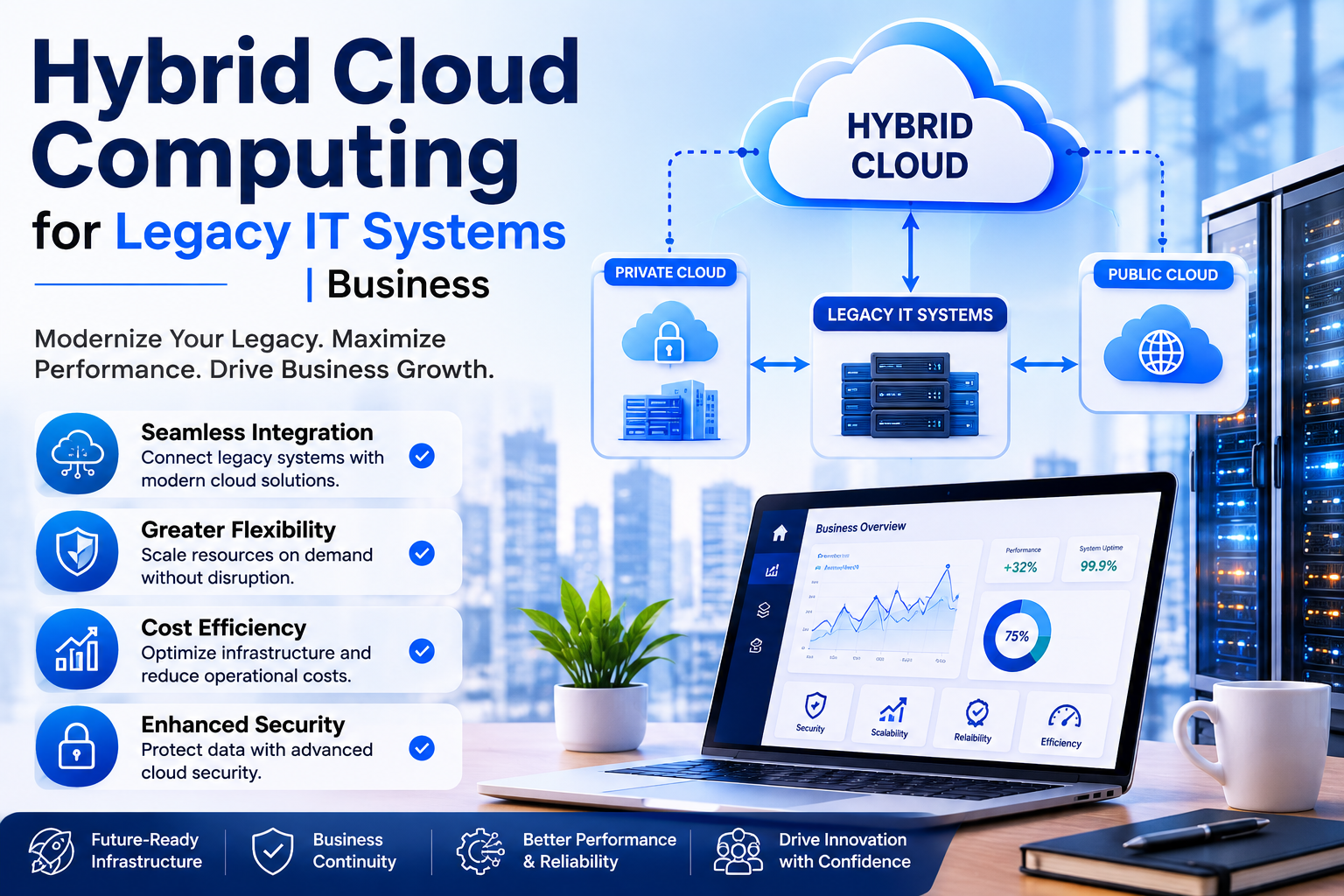
Hybrid cloud computing combines private or on-premises IT infrastructure with public or hosted cloud resources. The goal is not simply to have servers in two different places. A properly planned hybrid environment connects those resources so they can support the business as part of a coordinated IT strategy.
For example, a company might continue running a specialized legacy application on an internal server while moving collaboration tools, backups, or selected workloads to cloud services.
The right combination depends on the organization’s applications, data, security requirements, operational processes, budget, and future plans.
Why Legacy Systems Make Cloud Migration Complicated
Legacy systems can create practical barriers to an all-at-once cloud migration.
An older application may depend on a particular operating system, database, hardware configuration, licensing model, or integration that was never designed for modern cloud environments.
There may also be business reasons to keep certain systems where they are. A production environment might rely on predictable local performance, while a specialized application could be expensive or risky to replace.
That does not mean the business has to remain stuck with its existing infrastructure.
Instead, modernization can happen in stages.
How Hybrid Cloud Computing Supports Legacy IT
A hybrid model gives businesses more options when deciding what should stay, what should move, and what should eventually be replaced.
Rather than treating the entire IT environment as one migration project, technology teams can evaluate individual workloads and determine the most appropriate environment for each one.
This can help organizations:
- Modernize without disrupting every business system at once
- Extend the useful life of selected legacy infrastructure
- Introduce cloud services where they provide a clear operational benefit
- Improve access to systems for distributed or remote teams
- Create a more structured path toward future IT changes
The important point is that hybrid cloud computing is not an excuse to keep everything exactly as it is. It should be used as a practical transition and operating strategy, with clear decisions about which legacy systems remain and why.
Which Workloads Should Stay On-Premises?
There is no universal rule for deciding what belongs in the cloud and what should remain on local infrastructure.
Businesses should look at how each workload operates and what it requires.
Legacy Applications With Hardware Dependencies
Some older applications depend on specific hardware or configurations that are difficult to reproduce in a cloud environment.
If the application is stable and still supports an important business function, keeping it on existing infrastructure may be reasonable while other parts of the environment are modernized.
Systems Requiring Consistent Local Performance
Certain workloads may benefit from local access, particularly where large amounts of data need to move between systems or where operations depend on predictable connectivity.
In these situations, retaining the workload locally while connecting it to appropriate cloud services can provide a more practical architecture.
Specialized or Difficult-to-Replace Software
Some businesses rely on industry-specific applications that cannot easily be replaced or migrated.
Rather than forcing an unsuitable migration, an IT strategy can account for the application’s current limitations while planning for its eventual replacement or modernization.
What Can Move to the Cloud?
Cloud adoption does not have to begin with the most complicated systems.
Businesses can start with workloads where cloud services provide a clear operational advantage.
Depending on the environment, this may include collaboration, remote access, hosted applications, backup services, selected infrastructure, or other workloads that do not have the same dependencies as legacy systems.
The decision should be based on business requirements rather than the assumption that every application should automatically become cloud-based.
Security Matters in a Hybrid Environment
Adding cloud services to an existing environment also changes the security picture.
A hybrid infrastructure can create additional connections between users, applications, servers, networks, and cloud platforms. Those connections need to be understood and managed.
Security planning should consider identity and access controls, endpoint security, network protections, data handling, backups, monitoring, and the way information moves between environments.
This is particularly important when legacy systems are involved because older infrastructure may not have been designed around today’s security expectations.
A strong hybrid strategy therefore looks beyond simply moving workloads. It considers how the entire environment is protected and monitored.
Hybrid Cloud Computing and Business Continuity
Legacy infrastructure can also create business continuity concerns.
If an important application depends entirely on a single physical server or local environment, an infrastructure failure can have a direct effect on business operations.
A hybrid approach can provide additional options for resilience, depending on the workload and architecture.
Cloud-based services may support selected recovery, backup, or continuity requirements, while critical systems can remain in place until they are ready for modernization.
However, businesses should not assume that using cloud services automatically creates a complete disaster recovery strategy. Recovery objectives, backup policies, dependencies, testing, and restoration procedures still need to be defined.
A Practical Path to Modernizing Legacy IT
The most effective hybrid environments usually start with understanding the existing environment rather than immediately purchasing new technology.
1. Identify What You Actually Have
Start with an inventory of servers, applications, databases, devices, network dependencies, cloud services, users, and critical business processes.
Without this visibility, migration decisions can overlook important dependencies.
2. Classify Applications and Workloads
Each workload can then be assessed based on factors such as business importance, technical requirements, security considerations, performance, compatibility, cost, and future value.
This helps separate systems that should move now from those that need more planning.
3. Decide What to Keep, Move, Replace, or Retire
Not every legacy system deserves to be modernized.
Some may remain temporarily. Others may be good candidates for cloud migration. Some applications may need replacement, while obsolete systems may simply need to be retired.
This approach prevents cloud adoption from becoming a technology exercise without a clear business purpose.
4. Plan Dependencies Before Migration
A legacy application rarely exists in isolation.
It may depend on authentication, file storage, databases, network shares, printers, integrations, or other systems. Mapping these relationships before making changes can reduce unexpected disruption.
5. Move in Manageable Stages
A phased approach allows the organization to learn from each migration before tackling more complex workloads.
It can also reduce operational risk compared with attempting to redesign the entire IT environment simultaneously.
The Role of Managed IT Support
Hybrid environments can become difficult to manage when responsibilities are divided between internal infrastructure, cloud platforms, users, applications, and multiple technology providers.
This is one reason ongoing IT management matters after the initial migration.
Framewerx describes its Framewerx 360 service as a structured approach focused on proactive oversight, operational consistency, and dependable IT performance. Its service model includes areas such as cybersecurity, support services, SaaS protection, management capabilities, auditable training, and vCIO services.
The broader approach is centered on moving away from purely reactive IT support toward ongoing planning, monitoring, and operational alignment.
For a business operating legacy and cloud systems together, that distinction can matter. The environment needs to be understood as a whole rather than managed as disconnected technologies.
When Should a Business Consider Hybrid Cloud Computing?
Hybrid cloud computing can be worth evaluating when a business has a mixture of older infrastructure and newer cloud requirements.
It may be particularly relevant when:
- Critical legacy applications cannot be migrated immediately
- Employees need more flexible access to business resources
- Existing infrastructure still has useful operational value
- The organization wants to modernize gradually
- Cloud services can solve specific business or infrastructure requirements
The decision should still come from an assessment of the actual environment.
There is no benefit in introducing a hybrid architecture simply because it is a popular technology model. If the architecture adds unnecessary complexity without solving a business problem, it may create more management work than value.
Common Mistakes to Avoid
Hybrid environments can work well, but poor planning can create unnecessary complexity.
One common mistake is treating cloud migration as a simple infrastructure move. Applications have dependencies, users have workflows, and security requirements extend across both environments.
Another is keeping legacy systems indefinitely without a modernization roadmap. A hybrid model can provide breathing room, but it should not become an excuse to ignore aging technology and increasing operational risk.
Businesses should also avoid assuming that cloud automatically means lower costs. Cloud pricing, licensing, management, connectivity, security, support, and migration work all need to be considered when evaluating the overall financial impact.
Most importantly, avoid designing the environment around technology first. Start with the business requirement, then determine which architecture supports it.
Building a Hybrid Strategy Around the Business
The strongest hybrid cloud computing strategy is not necessarily the one with the most cloud services. It is the one that creates a sensible relationship between existing infrastructure, modern services, security requirements, and long-term business objectives.
For a company with legacy IT, that may mean keeping a critical application on-premises today while moving other workloads to hosted services. Six months later, another workload may become a candidate for migration. Eventually, a legacy application may be replaced entirely.
That is modernization without unnecessary disruption.
Framewerx works with organizations on managed IT services, cloud services, cybersecurity, co-managed IT, and custom applications and integrations, with an emphasis on reliability, security, performance, and technology alignment.
Its approach also includes structured onboarding, technology alignment, documentation, monitoring, and ongoing planning, areas that can become increasingly important as an organization operates across multiple IT environments.
Conclusion
You do not have to choose between keeping outdated infrastructure forever and moving everything to the cloud immediately.
Hybrid cloud computing can provide a middle path, allowing businesses to modernize according to technical requirements, operational priorities, and actual business needs.
The first step is understanding what you have today, identifying where the risks and limitations are, and determining which workloads genuinely benefit from a different environment.
If your business is managing legacy systems alongside newer cloud technologies, consider starting with an IT environment assessment and a clear modernization roadmap. Framewerx can help organizations evaluate their technology needs and build a more structured direction for ongoing IT operations.
Ready to discuss your IT environment? Contact Framewerx to explore your options for cloud, managed IT, cybersecurity, and long-term technology planning.
Frequently Asked Questions
1. What is hybrid cloud computing?
Hybrid cloud computing combines on-premises infrastructure with cloud resources, allowing businesses to keep suitable legacy systems while moving selected workloads to more flexible cloud environments.
2. Can hybrid cloud computing work with legacy IT systems?
Yes. Hybrid cloud computing allows businesses to keep legacy applications that cannot be migrated immediately while gradually moving compatible workloads to cloud services as part of modernization.
3. Which workloads should stay on-premises?
Workloads with hardware dependencies, specialized software, or consistent local performance requirements may remain on-premises when migration could create unnecessary cost, complexity, or operational risk.
4. Does hybrid cloud computing improve business continuity?
It can provide additional options for resilience, backup, and recovery. However, businesses still need defined recovery objectives, backup policies, testing, and restoration procedures.
5. How should businesses start a hybrid cloud strategy?
Start by assessing servers, applications, data, dependencies, security, and business requirements. Then classify workloads and decide what to keep, move, replace, or retire.
Framewerx