
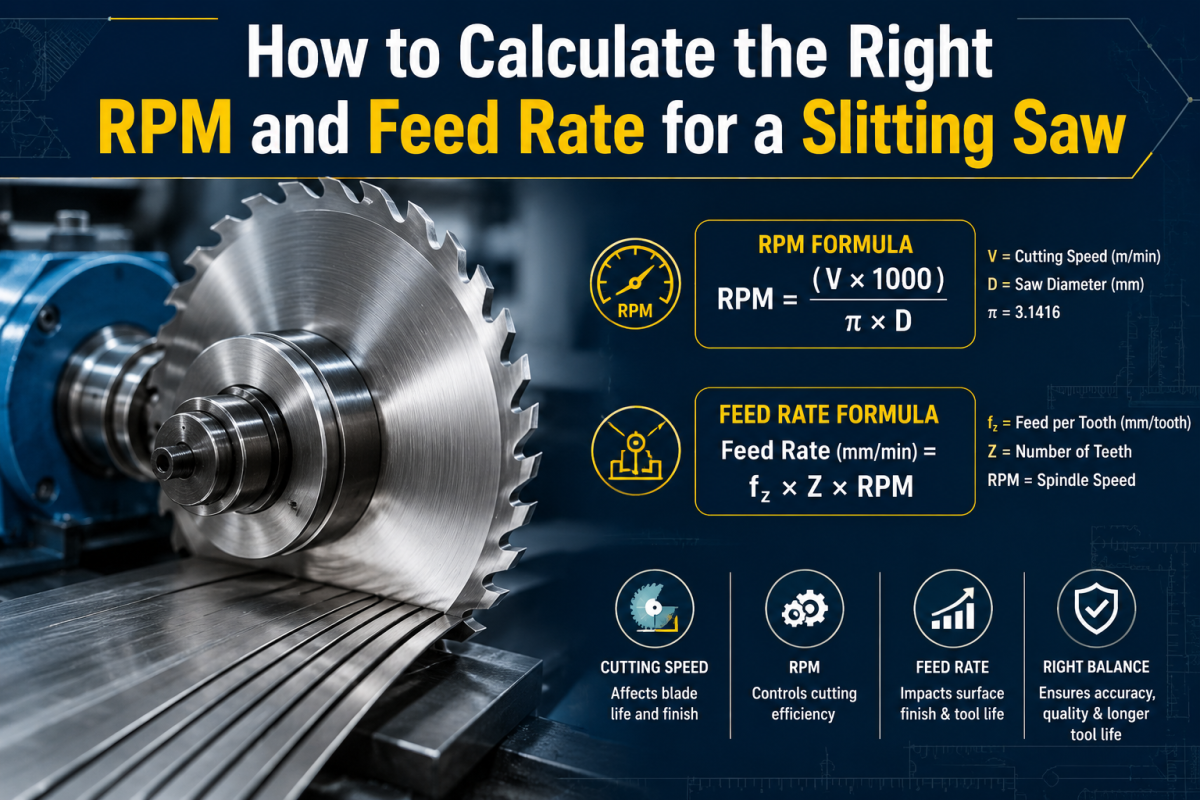
Cutting metal with a slitting saw looks simple on paper, but the math behind it decides whether you get a clean cut or a ruined blade. Machinists who skip this step often end up with burnt edges, chipped teeth, or a saw that snaps mid-cut. Getting the RPM and feed rate right protects your tooling budget and keeps your production line moving without interruptions.
This article breaks down the formulas, factors, and practical steps you need to set your slitting saw parameters correctly, whether you run a manual mill or a CNC machine.
What Is a Slitting Saw?
A slitting saw is a thin, circular cutting tool with teeth around its edge, mounted on an arbor and used to cut slots, grooves, or separate metal stock into pieces. Shops use it for slotting screws, cutting keyways, trimming stock to length, and parting off small parts. Because the blade is thin, it removes very little material per pass, which makes it ideal for precision work but also sensitive to incorrect speed and feed settings.
The thinness that makes a slitting saw useful also makes it fragile. A blade running too fast will overheat and dull quickly. One running too slow will rub instead of cut, causing chatter and premature wear. Feed rate errors cause similar damage too aggressive and the teeth chip, too light and the blade burns from friction rather than cutting cleanly.
Why RPM and Feed Rate Matter So Much
Every cutting tool has an ideal combination of rotational speed and material advancement rate. For slitting saws, this balance matters more than for thicker tools because there’s less blade body to absorb heat and vibration. A poorly calculated RPM turns the blade into a source of friction rather than a cutting edge, which shortens tool life and damages your workpiece finish.
Feed rate controls how fast the material moves into the blade, or how fast the blade moves through the material, depending on your setup. Set correctly, it produces consistent chip formation. Set incorrectly, it either stalls the cut or forces the blade to bite too deep, risking breakage.
The RPM Formula
The standard formula for calculating spindle speed for any rotating cutter, including a slitting saw, is:
RPM = (CS × 4) / D
Where:
- CS = Cutting speed of the material, in surface feet per minute (SFPM)
- D = Diameter of the slitting saw, in inches
- 4 is a constant derived from converting units (some references use 3.82, but 4 is the commonly rounded figure)
For metric calculations, the formula changes slightly:
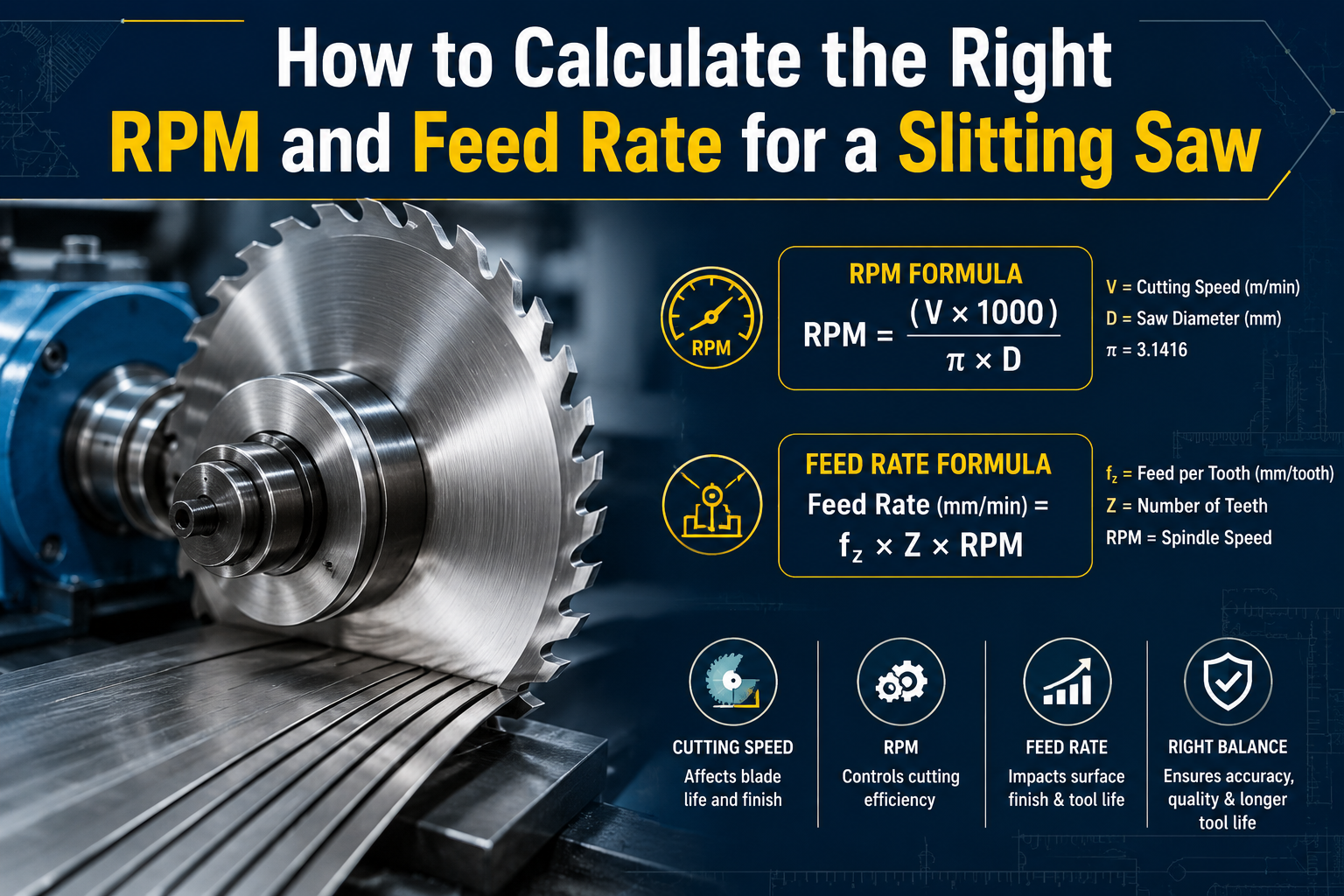
RPM = (CS × 1000) / (π × D)
Where CS is in meters per minute and D is in millimeters.
Finding the Right Cutting Speed
Cutting speed depends entirely on the material you’re cutting. Here are commonly referenced SFPM ranges for high-speed steel (HSS) slitting saws:
- Aluminum: 300–600 SFPM
- Mild steel: 70–100 SFPM
- Stainless steel: 40–70 SFPM
- Cast iron: 50–80 SFPM
- Brass: 150–300 SFPM
If you’re using carbide-tipped slitting saws, these numbers can increase by two to three times, since carbide withstands higher heat before dulling.
Worked Example
Suppose you’re cutting mild steel with a 4-inch-diameter HSS slitting saw and choose a cutting speed of 90 SFPM.
RPM = (90 × 4) / 4 = 90 RPM
This tells you the spindle should rotate at roughly 90 revolutions per minute for that combination of material and blade size. Larger blades require lower RPM to maintain the same surface speed at the cutting edge, while smaller blades require higher RPM.
The Feed Rate Formula
Once RPM is set, feed rate is calculated using:
Feed Rate (IPM) = RPM × Number of Teeth × Feed per Tooth
Where:
- RPM = the value calculated above
- Number of Teeth = total teeth on the slitting saw
- Feed per Tooth (FPT) = the chip load, or how much material each tooth removes per revolution, usually given in inches
Feed per tooth values vary by material and blade thickness, but general starting points for HSS slitting saws are:
- Aluminum: 0.001–0.003 inches per tooth
- Mild steel: 0.0005–0.0015 inches per tooth
- Stainless steel: 0.0003–0.001 inches per tooth
Worked Example
Using the earlier RPM of 90, assume the slitting saw has 40 teeth and a feed per tooth of 0.001 inches for mild steel.
Feed Rate = 90 × 40 × 0.001 = 3.6 IPM
This means the table or workpiece should advance at 3.6 inches per minute for that cut. Going faster risks chipping teeth; going slower risks rubbing and heat buildup.
Factors That Change Your Calculations
Several variables beyond the basic formulas shift your ideal RPM and feed rate for a given cut.
Blade Thickness
Thinner slitting saw blades flex more easily and demand lighter feed rates than thicker ones. A 1/16-inch blade cannot handle the same feed pressure as a 1/8-inch blade cutting the same material.
Number of Teeth
More teeth mean each tooth removes less material per pass, which allows for a higher feed rate without overloading any single tooth. Fewer teeth mean each tooth carries a heavier load, so you’d reduce feed rate accordingly.
Coolant Use
Cutting fluid reduces friction and heat, which allows for slightly higher cutting speeds than dry cutting. If you’re running dry cuts, drop your calculated RPM by 10–20% to account for the extra heat generated.
Machine Rigidity
A machine with more spindle play or a loose workholding setup cannot handle the same aggressive feed rates as a rigid, well-tuned mill. Chatter from a loose setup damages both the blade and the workpiece finish.
Material Hardness Variation
Even within the same material category, hardness varies by alloy and heat treatment. A 4140 steel in annealed condition cuts differently than the same steel after hardening. Always check the specific hardness rating of your stock before finalizing your numbers.
Practical Tips for Setting Up a Slitting Saw Cut
A few hands-on checks before and during the cut keep your RPM and feed rate calculations honest.
- Start conservative. Begin at the lower end of the SFPM and feed per tooth ranges, then adjust upward once you confirm the cut is stable.
- Listen to the cut. A properly running slitting saw produces a steady, even sound. Squealing indicates the RPM is too high or coolant is insufficient. Grinding or chattering suggests feed rate mismatch.
- Inspect chip formation. Clean, consistent chips indicate correct parameters. Dust-like particles suggest rubbing rather than cutting. Large, jagged chips suggest excessive feed.
- Check blade runout. Even a small amount of runout on the arbor can cause uneven tooth wear and inaccurate cuts, regardless of how well you calculated RPM and feed.
- Match blade selection to job. Maxwell Slitter Industries manufactures slitting saws designed for a range of materials, and selecting the right tooth count and coating for your specific application makes the RPM and feed calculations more forgiving.
Common Mistakes to Avoid
Small setup errors are what most often turn a correct RPM and feed rate calculation into a ruined blade or workpiece.
- Using generalized speed charts without adjusting for blade diameter. Charts give starting points, not exact answers for every setup.
- Ignoring chip load per tooth entirely. Some machinists set feed rate by feel, which works with experience but often causes premature blade failure for newer operators.
- Running the same parameters across different materials. Steel and aluminum have vastly different SFPM ranges, and using one setting for both damages the blade or wastes production time.
- Skipping coolant on tough materials. Stainless steel and other high-heat-generating metals need consistent lubrication to prevent tooth welding and blade warping.
Manufacturers like Maxwell Slitter Industries often provide technical data sheets with recommended speed and feed ranges specific to their blade designs, which removes much of the guesswork from initial setup.
Bringing It All Together
Calculating RPM and feed rate for a slitting saw comes down to two formulas, applied with attention to material type, blade specifications, and machine setup. Start with published cutting speed values for your material, calculate RPM based on blade diameter, then use tooth count and chip load to determine feed rate. Adjust based on real-world feedback from sound, chip formation, and surface finish.
Precision tooling suppliers such as Maxwell Slitter Industries design their blades with specific material applications in mind, so checking manufacturer recommendations alongside your own calculations gives you the most reliable starting point for any job.
FAQ Section
Q: What happens if I run a slitting saw at too high an RPM?
A: The blade overheats, teeth dull faster, and you risk warping or burning the workpiece edge.
Q: Can I use the same feed rate for carbide and HSS slitting saws?
A: No. Carbide tolerates higher speeds and feeds due to better heat resistance, so using HSS settings underutilizes carbide blades, while using carbide settings on HSS causes premature failure.
Q: How do I know if my feed rate is too aggressive?
A: Listen for chatter, inspect the cut for chipped teeth, and check if chips look jagged or oversized rather than smooth and consistent.
Q: Does blade diameter affect RPM directly?
A: Yes. Larger diameters require lower RPM to maintain the same surface cutting speed, while smaller diameters need higher RPM.
Q: Is coolant necessary for every slitting saw operation?
A: Not always, but it’s recommended for harder materials like stainless steel and for extended cutting runs to reduce heat buildup and extend blade life.
Q: Where can I find reliable speed and feed charts for slitting saws?
A: Manufacturer data sheets are the most accurate source. Companies like Maxwell Slitter Industries typically publish recommended ranges based on their specific blade geometry and coating.
Maxwell Slitter Industries